Company Organization
SmarterTools recommends emulating your company structure in SmarterTrack. For example, if your company (Brand) has several departments, such as billing, sales, development, or operations, and then sub-departments -- or groups -- you should set up SmarterTrack to have the same structure.
Each Department requires at least one Group -- known as the Front Line Group -- so that tickets emailed in or submitted via the customer-facing Portal have a place to go. A good rule of thumb for any Front Line Group is to add that to the Group's name. For example, "Sales Front Line" or even "Sales FLG" so that you can differentiate it from other Groups you create for that Department. Tickets from the Front Line Group can then be transferred to other Groups, or even other Departments, as needed.
Below is a simple graphic showing the structure of Vandelay Industries, a purveyor of fine latex products. Vandelay has 2 Departments: Sales and Support. Within each Department are 2 Groups. For the Support Department, there is the Front Line Support Group, which handles all incoming support requests. Then there is the Escalation Support Group, where harder or more time-consuming issues are transferred. The Sales Department, on the other hand, has Front Line Sales, where all sales requests go, and Enterprise Sales, where larger sales are transferred. Each Group, then, has a number of different Employees who handle their respective tickets. (Or live chats, or phone calls, etc.)
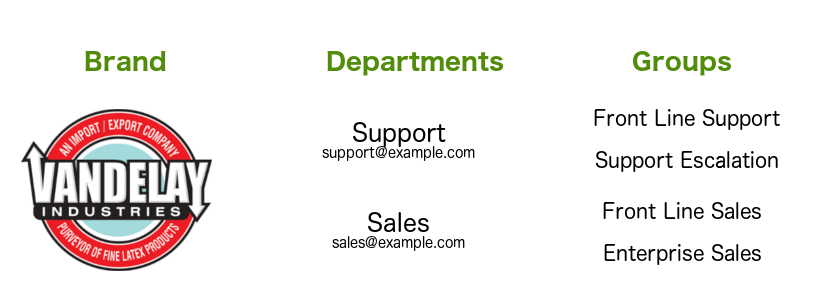
As you can see, each department will typically have its own email address, such as support@example.com or sales@example.com. SmarterTrack can import emails from these accounts to create new tickets for the department, and can analyze the email for responses to existing tickets. Replies to tickets are sent from the same department email address so that agents do not have to give their personal email addresses to customers, and all communication can be logged and tracked.
Departments are then broken into divisions called groups. For example, a support department may have Level 1 Support (less experienced support agents), Level 2 Support (more experienced support agents), and Support Management groups. When an employee from level 1 does not know how to respond to a ticket, they can simply transfer the ticket to a level 2 employee. This can be done with live chat as well.
Depending on the size of your company, you may have several different groups within each department. Each group may have different permissions assigned to it, giving organizations the ability to assign agents within a single department varying access to information.
The following examples will help illustrate how typical companies may set up SmarterTrack and will explain some fundamental organizational concepts.
A Small Travel Agency
Company Info: This is a small travel agency that deals with a limited number of clients. The company has five employees: two employees work in sales; one employee coordinates scheduling and reservations; one employee performs HR, billing, and office management duties; and another individual owns the company and serves as the CEO.
Reason for Adopting SmarterTrack: The company intends to use SmarterTrack to offer support through email tickets, specifically regarding changes to travel plans and sales inquiries. They intend to use live chat during business hours for sales inquiries if their agents are available. They would also like to track the source of customers that ask for help.
Recommended Organization: Since there are relatively few employees in the company, the need for separate escalation groups is probably not necessary. As a result, a good setup for the company in SmarterTrack would be the following:
- Sales Department, sales@example.com
- Level 1 Sales
- Reservations Department, reservations@example.com
- Level 1 Reservations
In this example, the two sales agents should be assigned to the sales department and the agent in charge of scheduling and reservations should be assigned to the reservations department. Since no customer interaction would be expected for the CEO or the HR departments, no departments will be created for them. The billing role in a small company like this could be done through a billing department or through the existing sales department.
Reservations should not be a public department, so the administrator will configure SmarterTrack so that this department is not accessible to customers from the portal. By disabling this department from appearing in the portal, customers will not be able to submit new tickets or live chats directly to the reservations department. Instead, they will only be able to respond to emails sent to them from the reservations department.
To track data such as how customers heard about the company, the administrator should also set up custom fields. For example, the administrator may add a custom field called "Referrer" that displays in the default live chat and ticket templates, and he may edit the template to ask the customer, "How did you hear from us?" The customer could then choose from options like "Magazine," "TV," etc. This custom data could be reported on later.
A Medium-sized Equipment Manufacturer
Company Info: This is a medium-sized manufacturer that has two different public brands. Brand ABC manufactures computer equipment and Brand XYZ manufactures copy machines. The company has 50 employees that handle customer service, product development, quality assurance, HR, and billing for both brands.
Reason for Adopting SmarterTrack: The company intends to use SmarterTrack to respond to customer service inquiries 24/7 via tickets and live chat. The company chose SmarterTrack because it could manage communications for both brands using the same installation.
Recommended Organization: In this example, the 50 employees that handle customer service, product development, quality assurance, HR, and billing for both brands should be set up as SmarterTrack agents. A good setup for the company would be the following:
- Customer Service Department, customerservice@example2.com
- Level 1 Customer Service
- Level 2 Customer Service
- Customer Service Management
- Product Development Department, productdevelopment@example2.com
- Group for each project
- Product Development Management
- Quality Assurance Department, qualityassurance@example2.com
- Group for each project
- Quality Assurance Management
- HR Department, hr@example2.com
- Benefits
- Payroll
- HR Management
- Billing Department, billing@example2.com
- Level 1 Billing
- Accounts Payable
- Accounts Receivable
- Billing Management
The administrator should also set up both brands in SmarterTrack. In this example, each brand should have its own customer service department, as this will allow the company to assign agents to each brand.
Because the company's goal is to provide tickets and live chats 24/7, the company should require agents to login and out of the system each day and enable Round Robin distribution for agents. This will ensure tickets and live chats are distributed evenly among logged in agents.
The company may choose to use custom fields to gather additional customer data, such as a product or serial number, or search templates to provide automatic lookup of other data. The company may also use external providers to integrate their existing login system or to automatically escalate tickets from specific customers. Alternately, the events system can be used to perform this function.